How to check that The Copy Viking is your referring affiliate (WarriorPlus)
To get our Copy Viking bonuses, your purchase has to be credited to The Copy Viking's WarriorPlus affiliate account. Here's how to check before you pay.
Before you buy
- Open the product through a purchase button on Soren's bonus page. Don't go to the vendor's sales page directly or through another link, or the referral may not be ours.
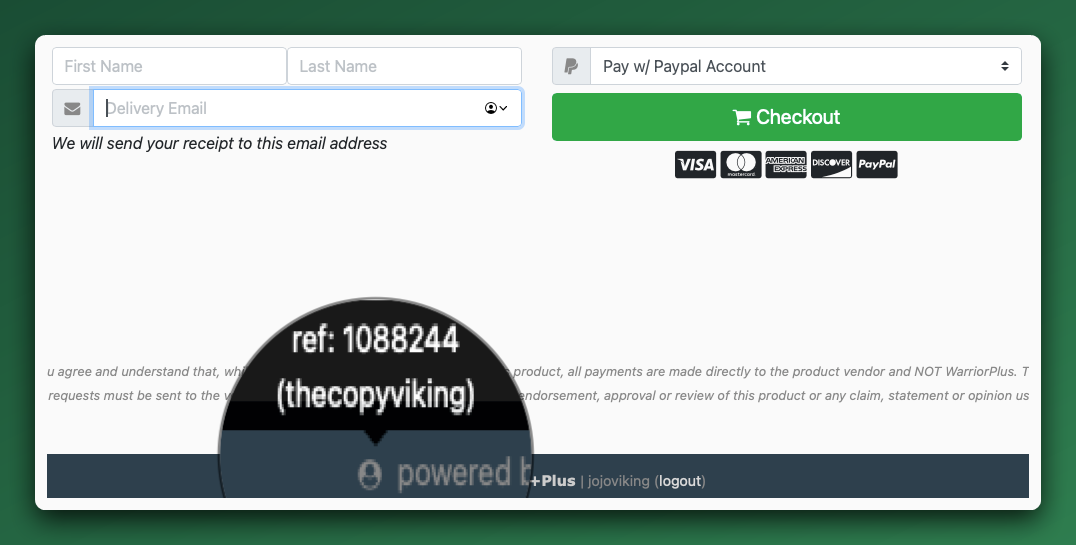
- On the WarriorPlus checkout page, scroll to the bottom and find "powered by WarriorPlus".
- Hover over the small person icon beside it. A tooltip appears showing the referring affiliate.
- It should say: ref: 1088244 (thecopyviking). That's Soren's account.
- If it shows a different name or number, don't complete the order. Go back to Soren's bonus page and click the purchase button again, then check once more.
After you buy
- Go to your WarriorPlus purchases: https://warriorplus.com/account/purchases
- Find your order
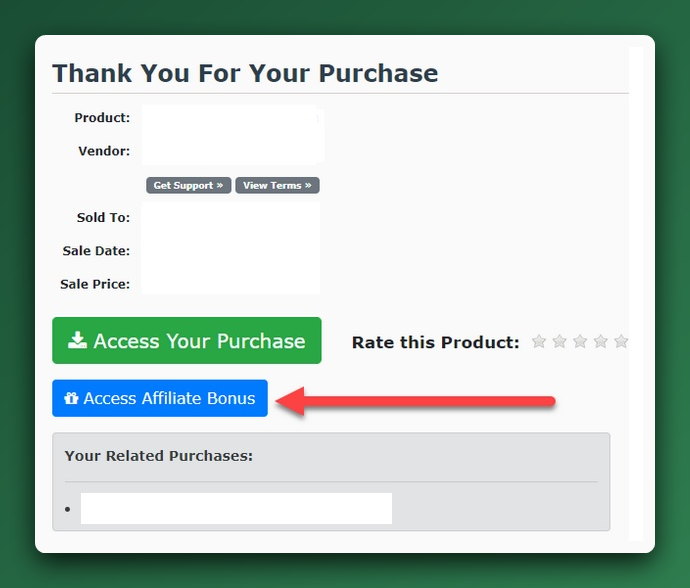
- Click "Access Affiliate Bonus" (see screenshot)
Can't find the bonus link, or not sure the referral was right? Contact us with your purchase details.